
We use cookies to make your experience better. Learn more about how and why.

Gift Tags: Label a Donation Any Way You Need To

Gift tags

Tag gifts by whatever matters to you, and let DonorDock apply seven of them automatically.
Campaign, appeal, and fund cover most of what you need to know about a gift. Gift tags cover the rest — silent auction, board give, memorial, tribute, anything your organization tracks that does not fit a standard field.
A gift report in DonorDock with the Add menu open, showing Tags under Add to Gifts and Badges, Marketing Lists, and Activities under Add to Contacts — the bulk tagging options available from any report.
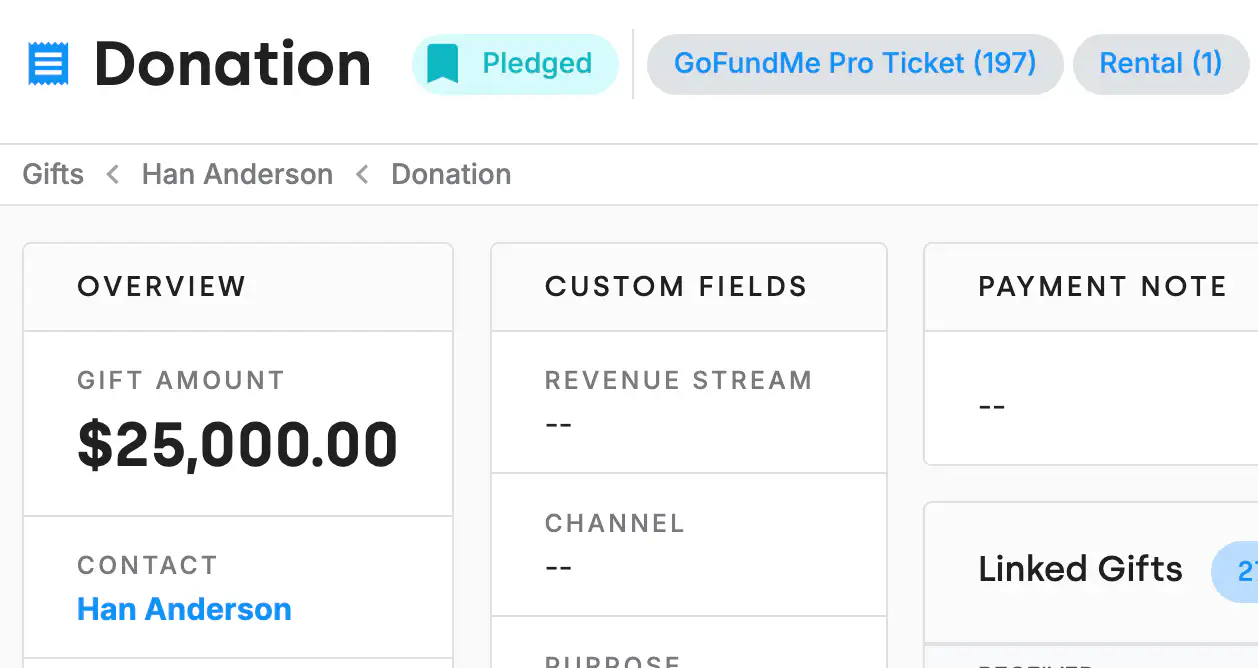
A DonorDock gift record header showing its status and two gift tags attached to the donation as chips.

Badges are for people, gift tags are for gifts

If you already use badges on contacts, gift tags work the same way one level down. They attach to a gift record and stay there indefinitely, characterizing that donation by whatever quality you care about. Common ones: Major Gift, Matching Gift, Silent Auction Gift.

The reason this matters: without gift tags, teams start abusing the appeal field to record things that are not appeals, and two years later nobody can report on either one cleanly.

Seven tags DonorDock applies for you

Some tags do not need a human at all. These are added automatically:

  • Major Gift — when a gift passes your organization's major gift threshold
  • Spike Up Gift — when a gift exceeds your Spike Up value, meaning a donor gave notably more than usual
  • Reactivation Gift — when a gift moves a contact from Lapsed back to Donor
  • Linked Soft Credit and Linked Matching — on gifts created as linked under another gift
  • DAFpay gift and DAFpay Soft Credit — on gifts that come through the DAFpay option on a giving page

Reactivation Gift is the quietly valuable one. It means you can answer "did our lapsed donor mailing actually work" with a filter instead of a guess.
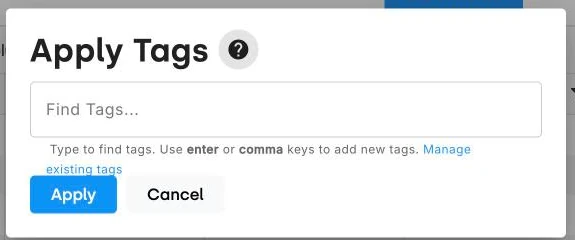
The Apply Tags dialog in DonorDock, where you find existing tags or type a new one to apply across a whole set of gifts at once.
A DonorDock gift record header showing its status and two gift tags attached to the donation as chips.

Frequently Asked Questions

What is a gift tag?
A label attached to a gift record that characterizes or segments that donation based on qualities the campaign, appeal, and fund fields do not cover.

How are gift tags different from badges?
Badges apply to contact records. Gift tags apply to gift records. Same idea, different object.

How do I add gift tags in bulk?
Run a gift report, then assign the tag across the whole result set. Tags can also be assigned in bulk during an import.

Which gift tags are applied automatically?
Seven: Major Gift, Spike Up Gift, Reactivation Gift, Linked Soft Credit, Linked Matching, DAFpay gift, and DAFpay Soft Credit.

What is a Reactivation Gift tag?
It is applied automatically when a gift moves a contact from Lapsed status back to Donor status — useful for measuring whether a reactivation campaign worked.

Can I remove a gift tag from every gift at once?
Yes. A tag can be deleted from all gifts carrying it, and individual tags can be corrected.

The Apply Tags dialog in DonorDock, where you find existing tags or type a new one to apply across a whole set of gifts at once.
A DonorDock gift record header showing its status and two gift tags attached to the donation as chips.
The Apply Tags dialog in DonorDock, where you find existing tags or type a new one to apply across a whole set of gifts at once.
User ratingUser ratingUser ratingUser ratingUser rating
G2 rating badge in yellow
Trusted by 7,600+ users

You'll believe it when you see it.

Schedule a demo and see why 7,200+ people trust DonorDock for their CRM.
Integration iconIntegration iconIntegration iconIntegration iconIntegration iconIntegration iconIntegration iconIntegration icon

Get more value from your tools

Connect your tools, connect your teams. With over 100 apps already available in our directory, your team’s favorite tools are just a click away.

Start building meaningful donor relationships today.

Your fundraising in one place.
Donor Dock-Shapes1-06