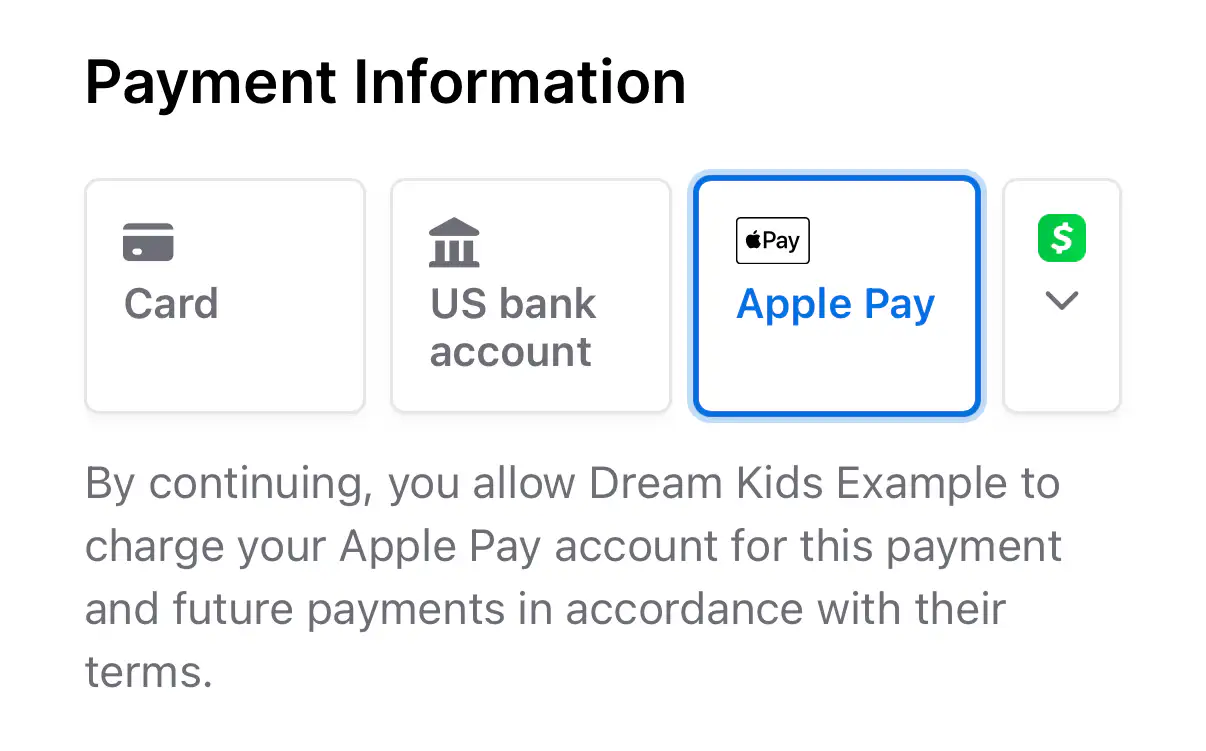
Connect Stripe to your DonorDock Online Giving Forms, and Apple Pay and Google Pay show up for donors whose device and browser support them. If you embed a giving form on your own website, register that domain in Stripe so the wallet buttons can appear there too.
With DonorDock, giving is a breeze. Donors can use Apple Pay and Google Pay to make secure donations quickly and easily. These trusted digital wallets provide a seamless and safe way to give, boosting donors' confidence and convenience throughout the giving process.
Wallets are one piece of online giving in DonorDock, sitting alongside cards, ACH bank transfers and Cash App on the same form.
Digital wallets work right inside the giving forms embedded on your website. Once your domain is registered with Stripe, donors can give with Apple Pay without leaving your site, turning a few taps into a completed gift. Fewer steps at checkout means more donors follow through.
Wallet gifts follow the same structure as every other online gift: DonorDock's 2% platform fee plus your payment processor's standard card processing. Stripe sets the processing rate for your account, and you can let donors choose to help cover processing costs at checkout.
Building a monthly giving program? Here's how recurring donations can steady your budget.
Are Apple Pay and Google Pay secure?
Yes. Both use tokenization and biometric authentication (Face ID, fingerprint). Actual card numbers are never shared with the nonprofit. Payments are processed through Stripe's PCI-compliant infrastructure.
Do donors need a special app?
No. Apple Pay and Google Pay are built into donors' devices. If they have a card saved in their digital wallet, they can use it on your DonorDock giving page with one tap.
Can donors give with Apple Pay or Google Pay?
Yes. When Stripe is connected, DonorDock Online Giving Forms can offer Apple Pay and Google Pay to donors on supported devices and browsers. For a form embedded on your own website, register that domain in Stripe first.
What fees apply to digital wallet gifts?
The same ones that apply to any online gift: DonorDock's 2% platform fee plus Stripe's processing for your account. You can check your exact Stripe rates in your Stripe dashboard.
Can I turn off a wallet option?
Yes. In your Stripe Dashboard, go to Settings, then Payment Methods, choose DonorDock in the Platform dropdown, and switch off any method you don't want on your giving forms.


.webp)