
Most nonprofit technology fails for people reasons, not software reasons. Systems break down when no one owns them, training is an afterthought, and maintenance stops at go-live. Diagnose whether your constraint is the tool or the ownership before you spend a dollar replacing anything.
The story usually goes like this. The development team stops trusting the reports. Gift entry backs up. Every mailing starts with three hours of list-building in a spreadsheet, and the person who actually understands the database is doing it off the side of their desk. Eventually someone says the thing everyone has been thinking: "We need a new CRM."
Sometimes that is true. But after watching this cycle play out across the sector, we can tell you where the evidence usually points: A failed nonprofit software implementation is almost always a people strategy failure wearing a technology costume.
Why do nonprofit CRM implementations fail?
Because organizations budget for the tool and starve everything around it. In the 2024 Nonprofit Digital Investments Report from NTEN and Heller Consulting, training accounted for roughly 1 percent of nonprofit technology budgets, while hardware took 54 percent and software licenses another 14 percent. Read that again: for every hundred dollars nonprofits spend on technology, about one dollar goes to helping humans use it.
The failure pattern is not unique to nonprofits. When University of Oxford researchers analyzed 1,471 IT projects, they found an average cost overrun of 27 percent, and a full one in six projects became what they called a Black Swan, blowing past its budget by 200 percent on average. Big system changes are inherently risky. What tips them toward failure is rarely a missing feature; it is unclear ownership, thin training, and no plan for what happens after launch day.
Nonprofit teams already sense this. In the same NTEN and Heller study, only 33 percent of nonprofits said a new or improved CRM would help them raise more money, while 46 percent said it would not. And notably, the more recently an organization had invested in a CRM, the less it believed a new one would help. Teams that just lived through a switch know the switch was not the hard part.
What does an unowned system look like?
Ownership gaps hide in plain sight because everyone is working hard. Look for these signs instead of listening for complaints:
- Recurring manual work that the system should do. Someone rebuilds the same mailing list, the same lapsed-donor report, the same board summary every month, from scratch.
- One informal expert. When something breaks, everyone knows exactly who to ask, yet that person's job description says nothing about the database.
- Reports nobody trusts. Two exports give two different totals, so staff keep private spreadsheets as the "real" numbers.
- Paid-for features gathering dust. Automations, dashboards, and integrations sit unconfigured because no one has been given the time to learn them.
- Workarounds becoming the workflow. New staff are trained on the workaround, not the system.
Underneath these symptoms is capacity, not competence. NTEN's data shows 54 percent of nonprofit staff say they do not have enough time to learn new technology, and only about 40 percent of organizations include technology in their strategic plan at all. When learning time is nobody's job and the roadmap lives in nobody's plan, systems drift no matter how good the software is.
Is it the tool or the ownership? A five-question diagnostic
Before any replacement conversation, answer these five questions honestly:
- Does one named person own this system? Not "the development team." A name, with hours attached.
- When did anyone last get trained? If the answer is "at implementation," the gap is training, not tooling.
- Is there a standing rhythm for maintenance? A recurring time when data gets cleaned, issues get logged, and small fixes get made.
- Can you list your top three system frustrations, and has anyone tried to fix them in the current platform? Untried fixes are evidence of an ownership gap, not a tool gap.
- Does leadership treat the database as fundraising infrastructure or as an expense? If it has never appeared in a strategic plan or board conversation, the culture has not committed to any system, including the next one.
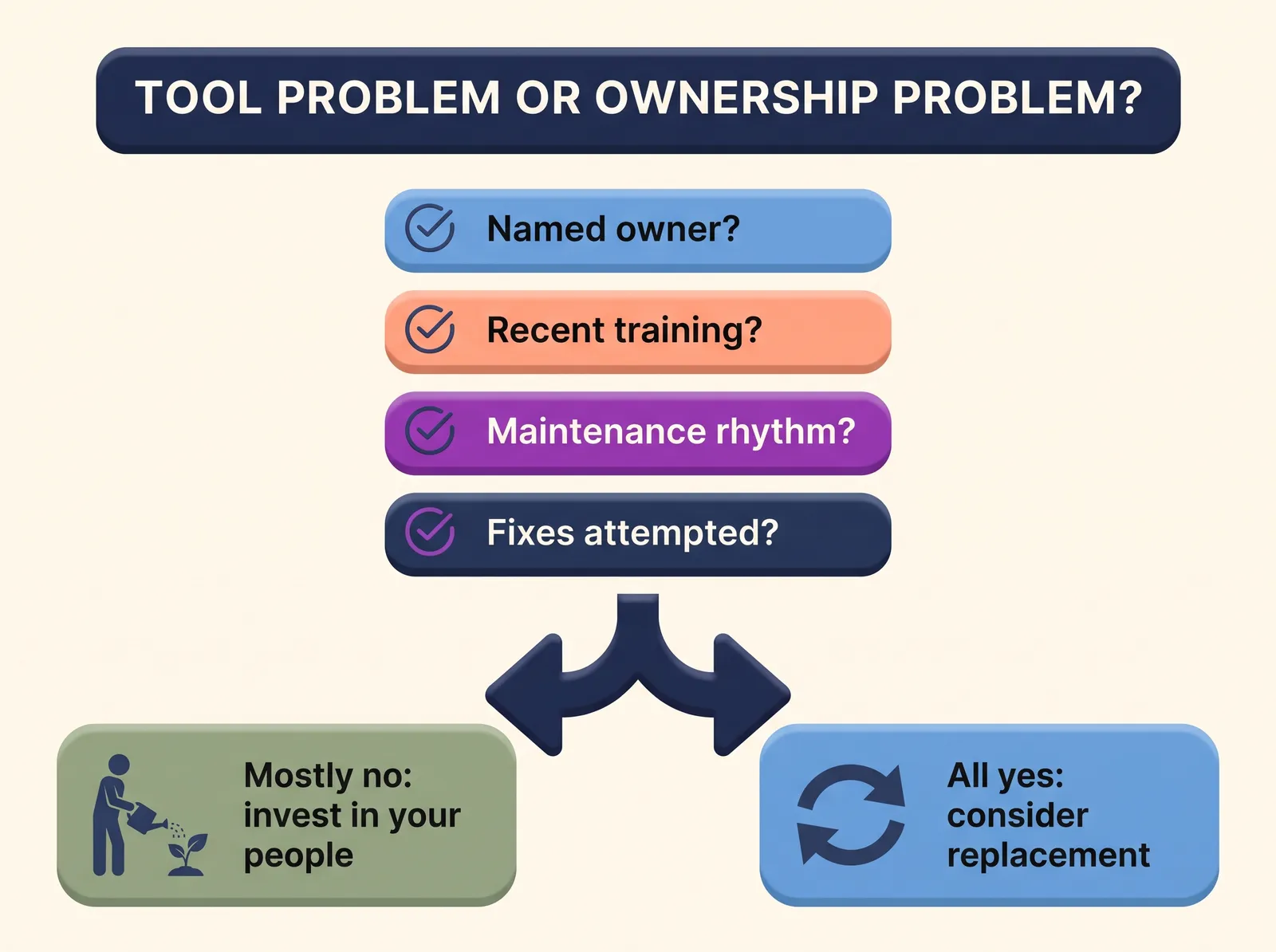
If you answered no to two or more of the first four, you have an ownership problem, and it will follow you into any new platform. The evidence here is striking: in NTEN's analysis of eight years of Tech Accelerate assessments, organizations with no dedicated technology staff triggered risk flags on nearly 60 percent of assessment questions, compared to 28 percent for well-staffed organizations. The differentiator was not which vendor they chose. It was whether anyone was responsible.
Why can't a new CRM fix an ownership gap?
For the same reason a new treadmill cannot fix a running habit. The purchase feels like progress, and for a few months the launch energy carries you: there are meetings, a project plan, a consultant, attention from leadership. Then go-live arrives, the project ends, and the system is handed to the same team, with the same training budget, the same missing owner, and the same untouched maintenance calendar. The gap that broke the last system is still there, except now it is wearing newer software, and the organization is a year more change-fatigued.
To be clear, the tool does matter. We have written before about why your CRM choice matters, and we stand by it: a platform that fights your team's workflow makes every ownership problem worse. But the relationship only runs one way. A great platform cannot compensate for absent ownership, while a strong owner can wring real value out of a mediocre platform. Choose well, and then resource the humans, because only an owned tool delivers what the demo promised.
What should happen after go-live?
A donor database is not installed, it is tended. You would never say donor stewardship is "done" because the thank-you letters went out once. System stewardship works the same way. The teams that thrive keep three practices running permanently:
- A named owner with real hours. Formalize the role of the person already doing it informally. We wrote a step-by-step guide to creating a CRM owner role on your fundraising team, including sample job description language.
- A standing maintenance rhythm. A short weekly data check and a monthly systems review, kept on the calendar with the same seriousness as a donor meeting. Small issues get fixed while they are small.
- A yearly capability review. Once a year, ask what you are paying for but not using, and pick one feature to actually adopt. Our fundraiser's tool audit walks through this exercise.
This kind of ongoing attention measurably works: among organizations that completed NTEN's technology assessment more than once, 61 percent reduced their overall risk rate between assessments. Continuous small investment beats episodic big spending, which is convenient, because continuous small investment is exactly what a lean development team can afford.
Good platforms shrink the tending burden rather than adding to it. That is the thinking behind DonorDock's Action Board, which turns system signals into a daily list of next actions, so follow-ups and data gaps surface themselves instead of waiting for someone to run a report. Otto extends the same idea, drafting communications and flagging who needs attention from inside the nonprofit CRM your team already works in. The system should be the one doing the remembering.
How do you get leadership to invest in people, not just platforms?
If you are the one making this case upward, the budget conversation is winnable, because leadership already feels the gap. In the NTEN and Heller research, 45 percent of nonprofits said they spend too little on technology, and when asked what holds spending back, they named available budget (77 percent), lack of funder support (47 percent), organizational culture (44 percent), and leadership buy-in (28 percent). Culture and buy-in are the two barriers a Development Director can actually move.
Frame the ask in fundraising terms, not IT terms. A few hours a week of owned system time is what stands between your donor data and the appeals, renewals, and reports it exists to power. Ask for three specific things: a named owner with protected hours, a modest training budget, and technology's inclusion in the next strategic plan so the commitment outlives this budget cycle.
When is it actually the tool?
Sometimes the diagnostic comes back clean and the platform is still the constraint. Real tool problems look like this: core fundraising capabilities are missing outright (no recurring giving, no segmentation, no usable reporting), the vendor has stopped investing in the platform, pricing punishes growth so severely that you avoid adding records, or support tickets disappear into the void. If your team has an owner, a rhythm, and real training, and the frustrations persist, replacement is the right call, and it will succeed precisely because of the people practices you built first.
In that case, plan the move like the infrastructure project it is. Our guide on building a fundraising operations system pairs well with this decision, and our video on rethinking nonprofit technology as systems over software is a worthwhile watch before you shortlist vendors.
And if DonorDock ends up on your list, our onboarding team moves growing nonprofits over in days, not months, with the training included rather than bolted on.
The bottom line
Your CRM might genuinely be the problem. But statistically, the safer bet is that your system needs an owner, a rhythm, and a little training budget more than it needs a replacement. Run the five-question diagnostic before you run a vendor search. Whichever answer you get, you will make the next dollar you spend on technology work, because a person will be standing behind it.