TL;DR: A livestream fundraiser is a live, interactive broadcast (on LinkedIn, Facebook, or YouTube) built around a giving page and a short run-of-show. Plan one goal, one format, a sponsor-funded match, interaction prompts, and a 48-hour follow-up sequence. The follow-up is where viewers become lasting donors.
Livestream fundraising for nonprofits gets filed under "something the gaming crowd does." That's a missed opportunity. A 60-minute live show with a guest, a giving page, and a host who actually talks to the people in the comments is one of the most relationship-rich fundraising formats a development team can run, and it costs almost nothing to produce.
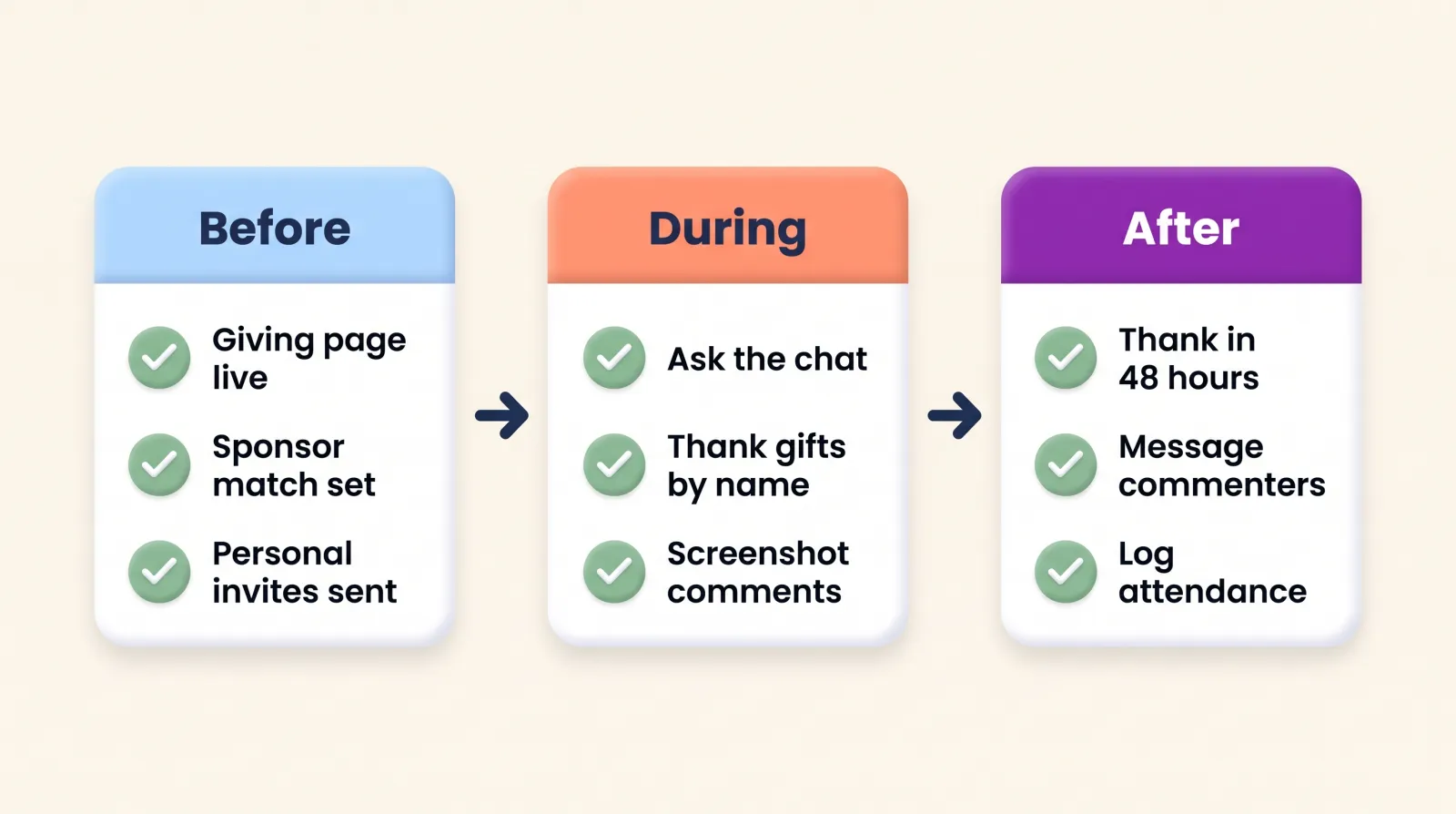
This playbook walks through how to host a livestream fundraiser in nine steps, with a run-of-show template, interaction prompts you can steal, and the follow-up sequence that turns viewers into donors who stick around.
What is a livestream fundraiser, and is it worth it?
A livestream fundraiser is a scheduled live video broadcast where your team, a guest, or a group of supporters raises money in real time while viewers watch, comment, and give through a linked donation page. It can be a one-off marathon or a recurring show. The giving happens online, but the thing that makes it work is the live, two-way conversation.
The ceiling is high. The week-long Awesome Games Done Quick 2026 marathon raised more than $2.4 million for the Prevent Cancer Foundation from more than 34,000 donations. Extra Life has raised more than $130 million for Children's Miracle Network Hospitals since 2008, with more than 2,600 teams and 15,000 participants in 2025 alone.
You don't need a gaming community to borrow the mechanics. Your audience is already watching live video: Pew Research Center reports that 84 percent of U.S. adults use YouTube and 71 percent use Facebook, and about half visit each at least once a day.
The tradeoff: a livestream is an engagement event first and a revenue event second. Treat it as a way to build a community that gives, not a one-night revenue spike, and it pays off for years.
What do you need to livestream a fundraiser?
Less than you think. A workable setup for a development team is:
- A browser-based streaming studio that can broadcast to several platforms at once (LinkedIn, Facebook, and YouTube) and bring guests in by link. Tools like StreamYard are one example. Pick whichever your team can run without a technician.
- A laptop with a decent webcam, a USB microphone, and a lamp pointed at the host's face. Audio matters more than video. A modest USB microphone will serve you better than an expensive camera.
- Two people on the night: a host who talks, and a producer who watches the comments, queues questions, and drops the giving link.
- A giving page built for the event, which we'll cover in step 2.
- A short run-of-show document everyone on the call can see.
If you have those five things, you're ready. Everything else is polish.
How do I host a livestream fundraiser? Nine steps
Step 1: Pick one goal and one format
Decide what the stream is for before you decide what happens in it. A dollar goal, a number of new monthly donors, or a number of sponsor-funded seats for a program are all fine. One goal gives the audience something to push toward.
Then pick a format that matches your team's energy:
- The one-off marathon (six, twelve, or twenty-four hours) built around a campaign moment such as GivingTuesday or year-end. Big effort, big spike, done. Our GivingTuesday toolkit covers how to anchor it to a campaign.
- The recurring show (60 minutes, weekly or monthly) with a guest each time. Lower stakes per show, and the audience becomes a community that recognizes each other in the comments.
If you're choosing, start with monthly. A show you can sustain for two years will usually out-raise a marathon you can only manage once. Fewer, better shows beat burnout every time.
Step 2: Set up the giving page before you announce anything
The stream will send people to one link, so that link has to be ready first. Build a dedicated event giving page in DonorDock (or whatever your platform offers) with the event name and the goal, plus a recurring giving option. Then:
- Shorten the link and put it in the stream description, the pinned comment, and an on-screen lower-third.
- Generate a QR code for viewers watching on a TV or a second screen.
- Make recurring giving the suggested default on at least one tier. M+R Benchmarks found monthly giving made up 27 percent of online revenue in 2025, and a live show is one of the few formats where "join us every month" feels natural because the audience already shows up every month.
- Turn on automatic receipts so the thank-you lands while the viewer is still watching.
Test the whole path on a phone the day before.
Step 3: Recruit sponsors to fund something tangible
Sponsors give a livestream its matching money and its most concrete story. Rather than selling "logo on screen," ask a business partner to underwrite a specific thing viewers can see filling up: twenty seats at a retreat, a month of a program, a match window during the last fifteen minutes. The sponsor gets named every time the host points to the goal.
Approach them the way you'd approach any corporate relationship, with a clear ask and a clear benefit. Our guide to building a corporate sponsor pipeline walks through the outreach.
Step 4: Build the run-of-show around a guest and the audience
A run-of-show is a timed outline. It keeps a live hour from drifting and tells your producer when to push the link. Here is a 60-minute template to adapt:
- 0:00 Welcome and an icebreaker question. Before anything else, ask the audience something easy and read the answers back by name.
- 0:05 Why we're here. The goal, the sponsor, the one thing their gift does tonight.
- 0:10 Guest conversation. A program participant, a volunteer, a partner, or a staff member with a story. Twelve to fifteen minutes.
- 0:25 Impact segment. Photos, a short clip, a number that moved since last time.
- 0:35 First ask and the match window. Point to the goal. Say the link out loud. Thank the first three gifts by first name.
- 0:45 Audience questions. The producer has been collecting them. Pick four.
- 0:55 Thanks, totals, and what happens next. Tell them when the next show is.

Print it. Share it with the guest. Tape it under the webcam.
Step 5: Source the story with care
The guest segment is the heart of the hour, and the person telling the story is usually someone your mission serves. Ask them the way you'd want to be asked: do your homework first, tell them specifically why their story matters for this audience, and make clear they choose what to share and what to leave out. A good story needs the hard part as well as the hopeful part, but it's theirs to shape.
Prepare questions together ahead of time, let them see the run-of-show, and give them a way to signal "let's move on" live. Our nonprofit storytelling checklist is a useful pre-interview tool, and this video on ethical storytelling and donor trust goes deeper on consent and dignity.
Step 6: Promote one-to-one, not just one-to-many
Personal invitations get attended. Two weeks out, split your list into three groups and give each a human touch:
- Board, sponsors, and peer-to-peer fundraisers: a personal message asking them to attend and to invite three people. Give them a calendar invite, not just a link.
- Current and lapsed donors: an email from the host, in the host's voice, plus a text reminder the day of. Our short donation text message examples include reminder formats you can adapt.
- Your social following: the public posts, yes, but also direct messages to the 30 people who comment most. They'll be your comment section on the night.
The reason this works is the same reason any social fundraising works: people turn out for people. We explain the mechanics in why relationships beat reach in donor engagement.
Step 7: Show impact live, and capture it as it happens
When your outcome is connection or belonging rather than a number, a live show is the best impact report you'll ever produce. Put the proof on screen:
- A photo carousel from the last event or program cohort.
- A 30-second clip of a participant in their own words.
- Screenshots of comments from previous shows ("I'm going through the same thing, thank you").
- A fundraising thermometer that updates while people watch. DonorDock's campaign goal thermometer can live on the giving page itself.
Have the producer screenshot the comment thread every ten minutes. Those screenshots become next month's impact segment, next week's thank-you graphic, and the proof you send sponsors. See showing donors the impact without a 20-page report for more ways to turn moments into evidence.
Step 8: Ask the audience questions, early and often
A host who talks for an hour gets a quiet chat. A host who asks gets a community. Write your prompts before the show so you're never improvising under pressure:
- Low-stakes openers: "Team tea or team coffee?" "Where are you watching from?" "One word for how this week went?" Silly is fine. Silly gets replies.
- Name people. "Maria says Denver, welcome back." Being recognized on a live show is a small thrill people come back for.
- Give the chat a job. "Drop a heart when the thermometer passes $2,000." "Tell us one person who should hear tonight's story."
- Read the questions back. The producer collects them, the host reads them aloud with the person's first name, the guest answers.
- Thank gifts in real time. First name only, every single one, within a minute. The producer watches the giving page; the host does the thanking.
Interaction is the whole point. Every reply is a supporter telling you they're there, and every name you say out loud is a stewardship touchpoint you just created in public.
Step 9: Run the 48-hour follow-up, then keep the loop going
Most livestream guides stop when the stream does. That's where the retention work starts. Within two days:
- Thank every donor personally. Automatic thank-yous and receipts go out the moment a gift lands. A short personal message or call from the host the next day handles the relationship.
- Message every commenter, donor or not. "You were in the chat Thursday, it made the show. Here's the recording and the moment everyone loved." People who were in the chat without giving this month are the warmest prospects you have for next month.
- Send sponsors their proof: the total, the comment screenshots, the photo of the thermometer crossing their match.
- Log attendance. Record viewers and commenters on their contact records, as an event activity or a note, so the stream shows up in their history the same way a gala would. Your best prospect list is last night's guest list, and a livestream is no exception.
- Start new donors on a journey. Build a stewardship journey for first-time givers that sends a welcome, a program update, and an invitation to the next show over the following month, so nobody who gave live goes quiet by accident.
- Announce the next date before the recording goes out. A recurring show is a recurring reason to be in touch.
Do this consistently and the stream stops being an event and becomes a channel, one that feeds the same donor outreach and retention system as your email, mail, and calls.
Pre-show checklist
Run through this the day before and again an hour out:
- Giving page live, tested on a phone, recurring option visible, short link and QR ready.
- Sponsor match confirmed, amount and window written into the run-of-show.
- Guest briefed, has the run-of-show, knows how to signal "move on."
- Interaction prompts written, producer has the question list and the giving page open.
- Stream scheduled on every platform with the link in the description and a pinned comment drafted.
- Personal invitations sent to board, sponsors, top commenters, and peer-to-peer fundraisers, with calendar invites.
- Day-of text reminder scheduled for donors who opted in.
- Lower-third graphic with the link ready to show every ten minutes.
- Follow-up templates drafted so the 48-hour sequence starts the next morning, not next week.
A livestream fundraiser is a lot of small things done in order. None of them is hard. The teams that make it pay off are the ones who treat the hour on screen as the middle of the process, not the end of it.
If you'd like to see how event giving pages and automatic thank-yous work together after a live event, take a look at online giving with DonorDock.