We use cookies to make your experience better. Learn more about how and why.
Feathr logo

Feathr

+
DonorDock

Connect Via Zapier

View all Zaps
What is Zapier?
Integrate DonorDock and 5,000+ apps with just a few clicks.
Zapier allows you to connect your applications to DonorDock, no technical prowess needed.

Connect Via Zapier

View all Zaps
What is Zapier?
Integrate DonorDock and 5,000+ apps with just a few clicks.
Zapier allows you to connect your applications to DonorDock, no technical prowess needed.

Connect Via Zapier

View all Zaps
What is Zapier?
Integrate DonorDock and 5,000+ apps with just a few clicks.
Zapier allows you to connect your applications to DonorDock, no technical prowess needed.

Feathr + DonorDock: See Every Ad Click Through to the Gift

Feathr is a digital marketing and advertising platform built for nonprofits. By connecting the Feathr Super Pixel to your DonorDock Giving Pages, you get full-funnel visibility into your digital ads, from the first click to the completed donation. Your team can finally see which campaigns drive real gifts, measure return on ad spend, and stop paying to reach donors who have already given.
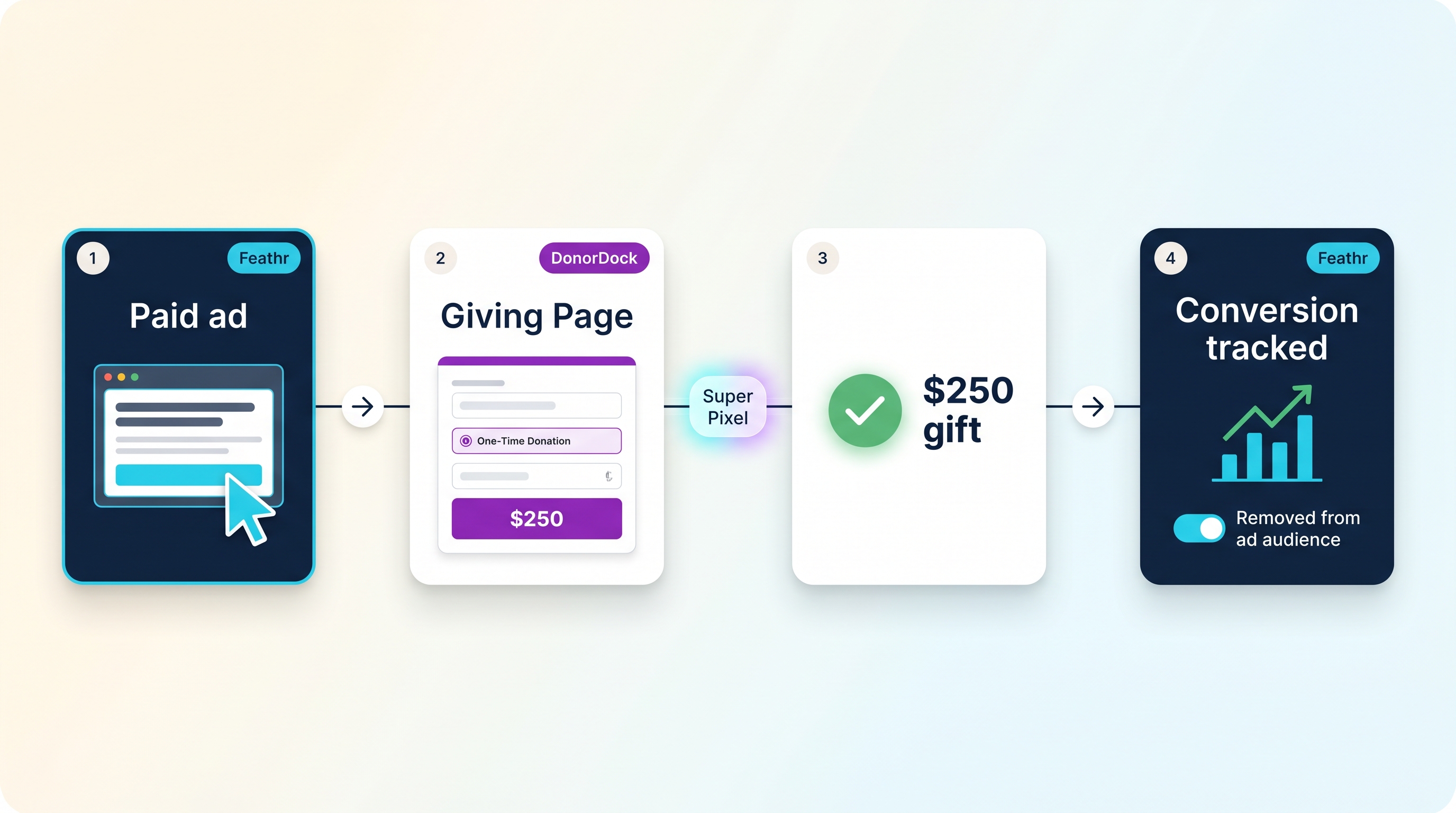
Feathr and DonorDock integration funnel: a paid ad click leads to a DonorDock Giving Page, a $250 gift, and a conversion tracked in Feathr that removes the donor from the ad audience.
How the Feathr and DonorDock integration follows the donor journey from ad click to tracked conversion.

What does the Feathr and DonorDock integration do?

The integration connects Feathr's conversion tracking to your DonorDock Giving Pages. When a supporter clicks a Feathr ad, lands on your DonorDock Giving Page, and makes a gift, Feathr records that gift as a conversion, including the amount. The donor is then removed from the ad audience automatically, so you stop spending budget to reach someone who has already donated.

How does the Feathr and DonorDock integration work?

It follows the full donor journey in four steps:

  1. Click: A supporter clicks one of your Feathr digital ads.
  2. Give: They land on your DonorDock Giving Page and make a donation.
  3. Track: The Feathr Super Pixel records the gift as a conversion, including the dollar amount, and credits the campaign that earned it.
  4. Optimize: The donor is removed from the ad audience, and your team sees true return on ad spend in Feathr.

Why connect Feathr to DonorDock?

Digital advertising usually goes dark at the click. Once a supporter leaves the ad for a giving page, most teams lose the trail and are left guessing which campaigns actually raised money. Connecting Feathr to DonorDock closes that gap so you can:

  • See full-funnel results, from ad impression to completed gift
  • Measure real return on ad spend and report it with confidence
  • Stop wasting budget on donors who have already converted
  • Double down on the campaigns and audiences that drive donations
  • Show your board and leadership the true impact of your marketing

What is the Feathr Super Pixel?

The Feathr Super Pixel is a small piece of tracking code that captures how visitors interact with your website and campaigns. Placed on your DonorDock Giving Pages, it lets Feathr recognize when a gift happens and record it as a conversion, powering accurate reporting and smarter ad targeting.

Who is the Feathr and DonorDock integration for?

This integration is built for nonprofits that run digital ads with Feathr and collect donations through DonorDock Giving Pages. If your team invests in paid advertising and wants to know exactly which campaigns turn into gifts, the Feathr and DonorDock integration gives you that answer.

How to connect Feathr to your DonorDock Giving Pages

  1. Copy your Feathr Super Pixel code from your Feathr account.
  2. Add the Super Pixel to your DonorDock Giving Pages.
  3. Confirm the pixel is active in Feathr, then start tracking conversions and building audiences.

No developer required. Once the Super Pixel is in place, conversions flow into Feathr automatically.

Frequently asked questions

Does the integration track donations made on DonorDock Giving Pages?
Yes. When the Feathr Super Pixel is added to your DonorDock Giving Pages, Feathr records each gift as a conversion, including the donation amount.

Are donors removed from my ad audience after they give?
Yes. Once a supporter converts, they can be removed from the ad audience so you stop spending to reach someone who has already donated.

Is this a built-in integration?
Yes. It is a direct integration that uses the Feathr Super Pixel on your DonorDock Giving Pages. No Zapier connection is needed.

Get started

Already using both platforms? Add your Feathr Super Pixel to your DonorDock Giving Pages and start tracking full-funnel results today. To learn more about Feathr, visit feathr.co. New to DonorDock? See DonorDock in action.

What is

Feathr

?

Feathr is a digital marketing and advertising platform built for nonprofits. Connect the Feathr Super Pixel to your DonorDock Giving Pages to track ad conversions, measure return on ad spend, and see which campaigns turn clicks into donations.

What is DonorDock?

Diamond icon
Build Relationships
With email outreach and nudges
Circle icon
Manage Donor Info
With an all-in-one CRM
Square icon
Accept Donations
With unlimited customizable donation pages
Book Your Demo

Related Articles

Why Most Nonprofit Rebrands Don't Lift Fundraising (and the Stickiness Gap That Explains It)

Why nonprofit rebrands often leave fundraising flat, and how brand stickiness turns brand investment into donor retention.

Read the article
Board-Powered Major Gifts: A Relationship Mapping Workflow

A 7-step workflow for using your board, LinkedIn, and your CRM to map donor relationships and run warm major gift introductions that actually convert.

Read the article
The Hidden Bias Costing Your Nonprofit Major Gifts

Comfort and status bias steer fundraisers toward the same easy donors and away from the ones who could fund the strategic plan. Here is how to spot it.

Read the article

Start building meaningful donor relationships today.

Your fundraising in one place.
Donor Dock-Shapes1-06